Saturday, March 15, 2014

I Love Pathaneer (பதநீர்)


Summer is approaching with the mercury levels raising everyday. On the other hand, water and electrolyte levels in our bodies are falling every hour. It is very important to keep yourself well hydrated and to maintain the electrolytic balance during summer season to avoid a lot of health problems and tiredness. So here is a sweet and affordable solution from Mother Nature! Pathaneer!

What is Pathaneer?

Pathaneer is a sweet beverage extracted usually from palm trees (sometimes also from coconut trees, but in Tamil Nadu, they are almost always from palm trees). It is a non-alcoholic beverage. But without proper preservation techniques, fermentation will kick in due to airborne yeast/bacteria, which will turn it in to alcoholic toddy. Pathaneer has a unique taste, which is predominantly sweet with a hint of astringent taste. It a translucent, white, watery liquid in pure form.

How it Is Extracted?

Pathaneer is collected overnight from palm trees by scrapping/cutting the tender spathes on top of the tree and keeping a collection pot. Usually the collection pots are coated with calcium carbonate to reduce the risk of fermentation. Tree climbers climb the trees during evening and prepare for the collection. Before daybreak, they again climb the trees and collect the Pathaneer as raising temperatures after sunrise may accelerate fermentation. They may need to climb 40 to 50 trees every day and most of the times, they work overnight. At this point, I take pride in remembering my ancestors who were such tree climbers (toddy tappers). That might be a job forced on them; but still, they didn't cheat or steal or forced others in to slavery!

Health Perspective

I can falsely claim that Pathaneer can cure all known diseases from hairfall to obesity. But the truth is Pathaneer is good at treating a major disease that affects almost everyone during summers. Thirst and dehydration. They may sound silly. But they can bring a host of health problems even before you become aware. Head aches, fatigue, increased blood pressure, decreased electrolyte etc can be caused by excessive sweating. So Pathaneer is an easy way to replenish the water and essential electrolytes in your body with a punch of carbs to keep you kicking throughout the day. Carbohydrates are the major nutrient, followed by calcium, phosphate, Vitamin B, Vitamin C and other trace micro-nutrients. It is surely a better choice than sugary sodas or packed fruit juices (which are nothing but chemical flavors and sugar). Only other alternate is tender coconut.

Where to Buy?

Pathaneer is packed and sold by Tamil Nadu State Palmgur Cooperative Federation in 200ml plastic pouches (like curd or milk packs). It costs around Rs. 10 and available in shops near you. They are cheaper than tender coconuts which are sold at a higher price around Rs. 30 to Rs. 40. Pathaneer packs are refrigerated and hence you can get a cool and refreshing drink without any hazardous chemical or excessive sugar for just 10 bucks. They are processed and packed to ensure that no fermentation happens and shoul be stored in optimal temperature. So don't buy if not stored in refrigerator.

What Else?

Pathaneer is just one product of palm nectar. It can be allowed to ferment to produce alcoholic beverage (toddy – கள்ளு). Fermented toddy can be distilled to produce arrack (பனஞ்சாராயம்). The nectar can be further boiled and processed to produce palmgur (கருப்பட்டி /பனைவெல்லம்), palm sugar (பனஞ்சீனி) and palm candy (பனங்கற்கண்டு). There are hell lot of other products/by products of palm tree, but they are not relevant to the Pathaneer which we are discussing here. So those who are interested can check “Additional Links” section.

An Appeal for Toddy!

I hear by humbly appeal both the Indian Government and Tamil Nadu Government to lift the ban on toddy and regularize the sale of the same as they have done with Pathaneer. If Pathaneer sales can be standardized, regularized and monitored to ensure quality, then why not toddy? Also, the government is allowing the sales of hard liquors, which contain more than 40% alcohol manufactured by corporates. But toddy contains only 4 to 5% of alcohol. By banning other liquors and allowing naturally brewed toddy, wine and beer, we can ensure that the livelihood of farmers are improved while the livelihood of drinkers are protected from excess alcohol consumption and economy drain.

Conclusion

So, enjoy Pathaneer this summer and be a proud Tamilian by drinking this palm elixir which is part of our cultural heritage. Also please appeal to government in whatever democratic ways you can to ban sales of hard liquor and allow toddy to be sold in a regularized and controlled way through cooperative societies or Tamil Nadu State Marketing Corporation (TASMAC). And when it comes to alcohol, my personal advice is to avoid it altogether than becoming an addict. Because “Perfect moderation is harder than total abstinence!” as told by St. Augustine.

Additional Links:


Monday, March 10, 2014

Software Suggestions: 5 GNU/Linux Packages

1. SMPlayer

Want a clean, simple yet powerful media player? Tired of VLC? Don't want to use those trial/crippled sharewares? Then you should give SMPlayer a try. An awesome media player with support for lot of codecs.

Name: SMPlayer
License: GPL
Website: http://smplayer.sourceforge.net/

2. Stellarium

Are you a person who likes to stare at the night sky but couldn't due to various reasons? Then here is a software that can bring the space experience to your PC. Stellarium has lot of features that make things even more interesting. You can zoom in to objects, you can see the moons of Jupiter going around it! You can fast-forward the movements of heavenly bodies. You can get real-time position, scientific names etc for almost 210 million stars (you have to install those extra catalogs).

Name: Stellarium
License: GPL
Website: http://www.stellarium.org/

3. Freeciv

Do you think you can change the world? Give it a try with Freeciv. You begin to rule a small band of settlers, workers and an explorer. You have to research each and everything like pottery, iron working, gun powder and you can go till nuclear weapons, super conductor and spacecrafts. Also you can progress in to a republic or democracy. You can build wonders, city improvements etc. You have to keep and eye on each city so that people are content and the city is not slipping in to famine etc. If you start this game, surely it will take hours to finish :)

Name: Freeciv
License: GPL
Website: http://freeciv.wikia.com/wiki/Main_Page

4. Audacity

Edit your audios like a pro. You can filter noise, merge stereo to mono, invert stereo tracks to cancel out voice, alter pitch and lot more. It comes handy to edit audios for stage shows. It has ability to convert audio cassettes in to digital music with surprising results. If you love music and have lot of cassettes, you must try this out!

Name: Audacity
License: GPL
Website: http://audacity.sourceforge.net/

5. GIMP

Tired of using pirated versions of Photoshop? Is that serial-key generator for Photoshop contain virus? Don't have enough money to buy a license? Forget about that! Here is GIMP! GNU Image Manipulation Program (GIMP) can be used to create high quality images, icons, gif animations, wallpapers or just casual photo editing. Cartoon effect, pencil sketch effect, photo frame effect are readily available. In experienced hands, GIMP can work miracles.

Name: GIMP
License: LGPL/GPL
Website: http://www.gimp.org/

Sunday, March 9, 2014

Why You Don't Need an App for Everything - 10 Reasons

We need the so called "apps" in order to get the maximum out of the hardware of our phones. For example, without apps, how can we take photos or use the magnetic compass or flash-light? Apart from these hardware specific tasks, I think we don't need apps for things we can easily do with a good browser. I am not against necessary apps. But some people start to install every possible app out there. Is that the right way to go?

1. They eat up your memory
 
Apps usually eat up lot of memory in your mobile. Especially if you have a low end mobile, memory dedicated for apps will be lesser (< 300MB). Every app will occupy around 5 to 10MB and some even take up to 25MB (these are normal apps, not those games with fancy graphics and sound effects). Also with time, they store data as cache. This will result in low free memory in your phone which may cause it to slow down, crash often or behave in unexpected ways. Some "clever" people say they can move the apps to SD card. That too is not a good option. SD card apps are relatively slower and when you change your SD card or the SD card becomes corrupted, those apps are lost.

2. They consume your RAM

Apps are started and stopped by Android automatically. So when you reboot your phone, even without opening any app, many apps will be up and running. They occupy more RAM and when you open a message or contact book, those apps will be closed by Android to free some RAM for the app you are accessing. So, it too slows your phone down. Some people claim Android is smart enough to handle tasks. But those who use their phone with good amount of apps know what I am saying. Some "smart" people use task-killers to kill those tasks. But again, in few minutes those same apps will be started. There is no sure way to ensure that particular app is not started automatically than to uninstall it.

3. They suck your network bandwidth up

As mentioned in above point, apps automatically start and also start to consume your Internet connection. Some apps will be synchronizing, some may be downloading ads, others may be busy checking whether a latest version is available while some "great" apps are sending your private information to their servers. There are apps that upload your SMS, contacts, emails and even whatever you type etc to their servers. All these take a good amount of network bandwidth and you may run out of free data soon. Some "brainy" people try to circumvent this by going for "unlimited" data plans. Even then there will be a limit after which the connection speed will be throttled. Also when all these apps are chocking your network in background, you may wonder why that small email is taking so much time to be sent or why your browser is taking too long to show that your IRCTC ticket is not booked.

4. They drain your battery

As mentioned in points 2 and 3, these apps start and connect to Internet automatically. So they consume lot of power. They cause phones to heat up and you may not be able to call someone or listen to music as these apps had already sucked the last drop of power out of your battery. Some people come up with some "tricks" to sort this out. That is by installing an app to improve battery life. What an idea sirji! Some say they are not bothered as they always carry the charger with them. I think they also carry a generator with them or their charger is solar powered!

5. Slows down your phone

Due to insufficient internal memory, processor load, insufficient RAM, clogged network etc, your phone may slow down to unusable levels. One of my friend came to me saying that his phone's touch-screen was not working. I checked it. Actually the touch-screen was working fine, but due to overload, the response was slow. I uninstalled few bloatwares, and it started to work normally again.

6. Threat to your privacy

Most people won't give a damn about what all the permissions the app asks before installing. And Android's innovative design makes it impossible to restrict access to SD card or Internet at app level. There are some options like Droidwall to restrict the app's access to Internet, but still, it is is bit tough if the app demands that an Internet connection is needed to proceed and our people will set that app as exception permanently to avoid "hassles". There apps like Truecaller which uploads entire contact book with photos, pet name, and other details to Internet. I know people who store their PAN number, Bank account number, ATM PIN number etc in their contact book. Imagine what will happen if these details are uploaded to someone somewhere! I have recently seen some apps that require permission to send/receive SMS but they are actually meant to be live wallpaper.

7. They distract you a lot

These apps annoy you a lot by giving unwanted notifications. You may be awaiting an SMS from your bank stating your "one time password" for a credit card transaction or you may be in a meeting. "beeeep" There is a notification saying that some has invited you to play a stupid online game. To take it to the next level, some apps give alerts/notifications/reminders to rate their app in Playstore, purchase unlocked version or to try their new app. All these things distract you and waste your time for no good.

8. They have misleading ads

Yes, ads are there in websites too. But why I am mentioning it here as a specific problem in using apps? The ads in apps are displayed like buttons or links in the app itself. This misleads the user and make them click on them. Once clicked, you are taken to malicious websites/apps. Moreover, there are some apps which are meant to be used by kids, but contain ads suitable for adults.

9. They are hard to maintain

These apps are hard to find, install, keep updated and to use. For example, if you want to book flight tickets, then you have many apps to do that. How to tell which one suits your needs? Are you going to install every app and use them to find out? In case of websites, it is easy to just hit the URL and try it and move to other. Similarly, if you have many apps installed, you need to keep them updated. That costs you lot of data and also battery power. It can be time consuming at times. Also, if your home screen and app-drawer are crowded with these apps, it is hard to spot the app  you need. Yes, we can use the built-in search to spot the app, but still, it is not that easy right?

10. Most apps are unethical

Most apps are so called proprietary software or "closed-source". So, even if you want an app, please look in the F-Droid repo for a free software alternate. Don't use apps that don't respect your privacy or freedom. Don't feel proud about yourself that you have purchased an app and that is going to support the developer of that app. No! The developer only gets a fraction of the money you paid unless you directly pay the developer and get the app in some other way other than from the Playstore or App store. So these apps also cheat developers. So which developer will allow themselves to be cheated? Those who want to cheat others in some other ways right?

Points to Note:

So, as you can see, don't buy in to the apps argument and install any "crapp" unless and until you are sure that there is no other good way to do it and sure that the app is legitimate and respects your privacy and freedom.

1. Check for website alternates and use a good mobile browser like Firefox to access the site directly instead of using apps

2. Check the apps' developer and ensure that it is from a legitimate source. For example, you can find apps with same/similar names but from different developers (some apps are just repacked malwares)

3. Don't install .apk files shared in forums/sites/bluetooth etc. Download them from F-Droid or Playstore alone

4. Check the apps permission before you install. If the app asks unwanted permissions or if you feel suspicious about the permissions, don't install it, even if it seems a must have. Security first. Rest later!

5. Read reviews about the app both in the repository as well as in tech-sites. Now-a-days paid reviews are very common and there are companies that offer services to boost your Playstore ratings/reviews. So you should be able to differentiate between genuine and bogus reviews.

6. Periodically check and uninstall apps you no longer use.

7. Disable Internet connection while using apps that have ads.

Conclusion:

Apps are waste of time for users and waste of money for companies developing them. If you are a business looking for app development, my advice is, don't go for it. Are you going to build an app for every platform out there? (Android, iOS, Windows, Symbian, Ubuntu etc) It will cost you more to develop, bug-fix and make changes in apps for multiple platforms than to develop and maintain a good mobile site. If you are a developer, please advise the same to your clients who come to you for developing an app.

Sooner or later, everyone is going to realize that apps are not the solution for everything. So you better realize it now.

Related Sites:

Tuesday, March 4, 2014

When I Was a Kid...

When I was a kid, I used to play with kids next door. Suddenly a faint fluttering sound would appear. We would stop playing and listen carefully. When luck is by our side, the sound would steadily grow and grow. And one of the boys would cry "There!" Pointing his finger towards somewhere in the sky. A grey dot would appear. "Wow! Helicopter!” We would run behind it, street after street till the helicopter vanishes again with that faint fluttering sound in to the horizon. We used to stare at the sky for some time with the stray hope that it may return.

Sometimes the sound of a Bullet bike next street or some load-auto on road would cause me to run out and stare the sky and when the sound fades quickly, it was time to realize that it was not a helicopter and return home to face my mom awaiting to scold me for leaving the lunch behind. Rainy seasons were somewhat different. The moist air would make hearing the flying machines easy but clouds would make it tough to get a glimpse of them.


Jets and small planes used by forest department in nearby hills were like unicorns and mermaids. They were very rare, hard to spot and usually less visible due to distance and height. The smoke left behind by jets would remain for sometime and I used to stare at the sky with mouth open till the smoke dissolve in to the blue sky. Night time sightings were special due to those colorful blinking lights.

Me and my friends even believed that by climbing on a tree or roof of a tall building we can touch the helicopter or at least distract the people inside to drop us something. We tried that with my house's roof. Nothing happened! Then we thought my house was not tall enough. Some "big brothers" even told tales of hitting planes with stones, which we never believed but promptly nodded to them out of fear.

Then days rolled... I was an adolescent back then. I would be sitting with a book and reading or helping my dad with totalling corrected answer sheets when that familiar humming sound was heard. "Yes. It is a helicopter!" My heart would want to run out and look at the sky. But "grown up boys” won't be that silly right? That's what people say. So with a sigh, I used to continue what I was doing.

Now, after many years, I live near an airport. With hundreds of flights coming and going everyday. I work in upper floors of a very tall building and could see the flights even though it is bit far from the airport. Now I even earn enough to fly occasionally. But I have no time to stare at the sky, no interest left in watching them. I live/work in tall buildings but don't believe that i can touch the flights any more.


Last time I was bit excited about the sky was, when I accidentally clicked a photo of exploding space craft sent by ISRO. And dreams about reaching for the skies lasted seconds when I saw in news that NASA is looking for volunteers for a one way trip to Mars. Yup! We used to see beauty in petty things and longed for them to happen. Once grown up, things we thought boring when we were kids, like paying electricity bills or buying ration becomes priority. And this is the real beauty of our life!

Saturday, March 1, 2014

5 Resons to Use a Free Operationg System


1. Freedom and Free of Cost

With Free Software, you get freedom. That is what the "Free" in Free Software means. But for our people, who are brainwashed by corporate media, free also means for no cost. The good news is, most free operating systems also come for free of cost too. Don't come with vile excuses like you have a pirated copy of Windows or you got it bundled with your machine. Former is silly and later is stupid. It is silly to steal a product when a better product is available freely and it is stupid to claim that you got Windows free of cost with your machine, while you have paid for it through "Microsoft tax". Also you can be sure that no NSA agent is offered a backdoor in your machine. If you doubt it, look in to the source for yourself!

2. Secure

Free operating systems like GNU/Linux and BSD are more secure. There are only few know viruses exist for these platforms and they are also controlled currently. Unless you are foolish enough to reveal your password or keep a password that can be easily guessed or fooled to install a malware, you are almost safe. Even though I will suggest you to have a Free Software anti-virus program like Clam-AV to prevent propagating virus unknowingly to other platforms and any new threat.

3. All in One

When you install Windows, you have to install all drivers and other software separately. And some of them are costly too. It is time consuming to keep all of the installed software up to date. You have to check the software's website regularly and download the latest version and install them. With the software repository concept, (which was there as far back as I remember) Free operating systems allow you to install and maintain all software in one place. Also you can find free software alternate for almost all tools you like. When a new version of your favorite browser or media player is released, your system update itself will update them too. Isn't that easy?

4. Choice of UI

Don't like the Aero UI? You can switch to the Classic UI. Or you can console yourself by changing the color themes. These are the few options available with Windows. With the Free operating systems, you can have wide varieties like GNOME, KDE, MATE, Xfce, LXDE, Enlightenment, Cinnamon and I can't list them all here! You have that many choices. You can install whatever you want or you can install multiple desktop environments in a single system and switch between them in login screen. You can choose not to install any UI and use in CLI mode. This will suit servers and workstation for hardcore geeks like Torvalds or Stallman.

5. No Fragmentation

If you have used Windows for a good amount of time, then you should have noticed that the system slows with time. Why? This is due to file fragmentation. That is, files are stored scattered along the disk and the hard disk head has to move back and forth to read a sequence of data, say an audio or video file. This will also reduce the life of your hard disk. Windows comes with a defragmentor tool. But that too has lot of limitation. But free operating systems come with cutting edge journaled file systems which don't fragment with time. Even if they do very rarely, you can just copy the files to some other partition and copy them back. But I have never came across such situation.

Walking Tips

According to America Heart Association, we should get at least 150 minutes of moderate activity every week. That is the bare minimum. Each segment should last at least 15 minutes. This activity includes swimming, brisk walking, aerobics etc. But all things cost or need special location/trainer except walking. So I do this easy and effective exercise everyday.

WARNING: Walking for exercise (especially prolonged and brisk walking), like any other exercise have some limitations. You may need to consult your doctor if you have existing medical conditions or common problems like knee pain.If you are a healthy, normal adult in prime age, you can assume walking is safe for you.

Moderate walking means 100 to 120 steps per minute. It may vary with your age, weight and other health factors. Also, you should wear comfortable dress, shoes and well hydrated while walking.

According to experts, walking 10,000 or more steps a day makes you a person with "active lifestyle". 10,000 steps is around 8 kilometres. You may think it is too much. But that is required for your health, especially if you are working at offices, sitting all day long.

1. Morning Walking:

When you wake up in the morning, after bowel movement, drink a glass of water, put on your t-shirt, track suit and shoes and start walking in a nearby park or street or roads without traffic. This walking can be very brisk and if you feel like, you can also jog. Walk for at least 30 minutes. That will give you an initial start of 3,000+ steps for the day. You can enjoy the birds singing, sun rise, fresh morning air for free of cost. Except few rainy days, this is the best way to start your day. By this you will get 210 minutes of activity every week, which exceeds the American Heart Association guidelines of 150 minutes!

2. Use Public Transport:

Park your car/bike. Else better sell them off. Take a walk to your nearby bus-stop or railway station. Board a bus or train. Also walk those few blocks to your college/office from the bus-stop or railway station. By this you can add 1,500 to 2,000 steps to your count and you have covered 5,000 steps (yes! that is 50% of your daily target) before you reach office. Also you can be proud about you for being a socially responsible person by reducing the carbon emission and traffic.

3. After Lunch Walk:

Recent studies show that walking after meals can reduce your blood sugar levels and as well as provide three times benefits of usual walking. So after taking lunch, call your friend/colleague and walk slowly in a shaded place for 20 minutes. Chat with them about Free Software, music or just about anything you love. This will add another 1,000 to 1,500 steps to your count. Wow! That is 6,500 steps. Keep going! This walk also makes you brisk and refreshed and your afternoon work will be productive as good as in the morning.

4. Returning Home:

As we discussed early, returning home using public transport will again add 1,500 to 2,000 steps. So it will make the overall count to 8,000 steps.

5. Night Walking:

After having supper, call your wife/kids/parents and walk in your street for some 20 to 30 minutes slowly, talking about the day and other stuffs that relaxes your mind. This will add some 1,500 to 2,000 steps, making the total 10,000 steps per day within your reach. This walking will aid you to get a good sleep which will prepare you for an energy packed day ahead!

6. Hidden Extras:

Walking to shop to buy milk, walking inside home/office etc are not counted here. These will come around 1,000 to 2,000 steps. These extra steps won't harm you but benefit you! Count them as bonuses!

7. Other Tips:

If you are worried about days missed due to rain, you can invest on a treadmill. You can also install mobile apps that use GPS or accelerometer to measure the distance you cover. Else you can invest in pedometers to capture exact numbers of steps you walk a day.

Conclusion:

Walking is a good exercise for all ages. But it should not be considered as sole exercise. If you are fit enough, you can include other activities like jogging, cycling, aerobics, weight training, swimming etc. Also eat a balanced diet. Walking can't be an excuse to eat that extra samosa or chili bajji. Drink enough water. Avoid refined sugar, reduce salt intake and consume less fast-foods.

All these things, you can't do alone. You will get bored and start sliding in that slipper slope back to sedentary life-style. So encourage your family and friends to join you. By this, you are forming a team which will encourage you back, when you are down. With all these practices, you can improve your health and stay fit.

References:

Thursday, February 27, 2014

Time to Change

Windows XP's support is going to end this April. So if you are running Windows XP, it is time to go free. Free as in freedom. Here is a list of OS you can choose to get rid of the buggy, insecure XP platform.

1. aLinux


You won't feel that you have changed your OS apart from performance improvemnts, being virus free and less buggy. aLinux comes with KDE 3.5, Koffice(MS office replacement), GIMP(like Photoshop), mp3/divx/flash support, Clam-AV antivirus etc.

Get yours at http://alinux.tv

2. Lubuntu

So, this distro's look and feel is much like XP. It consumes less resources and feels great on old hardware. It comes with Abi Word, MTPaint, Xfburn (cd/dvd burning), Sylpheed (like Outlook). With 256 MB RAM, you get a perfectly working system.

More info: http://lubuntu.net

3. PC-BSD with Xfce

Ok, it may be boaring with too much Linux. Say hi to BSD with PC-BSD. Xfce gives you a classic XP like interface. AppCafe gives easy access for all packages you need and you will love its clean UI.

Check this out: http://www.pcbsd.org

4. Manjaro

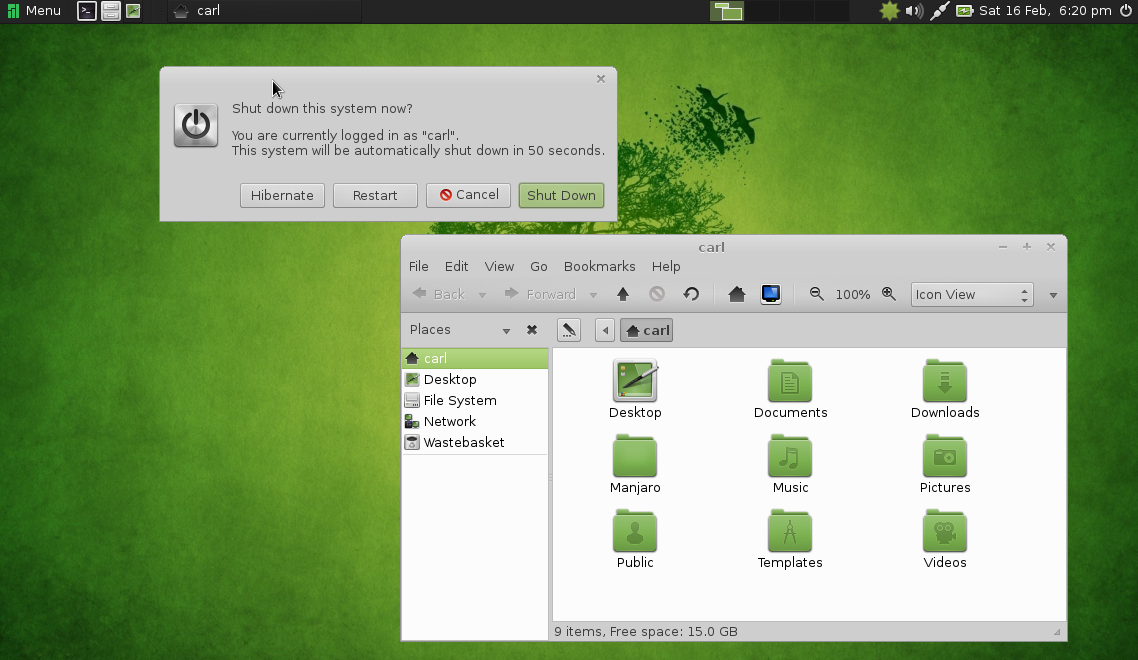
Still in beta, from the house of Arch, Manjaro ives you rolling release with a wide choices of desktop environments. I suggest MATE desktop, which is both modern and traditional simultaneously. Manjaro comes with out of the box multimedia support and good hardware driver support. Only downside is, it needs bit powerful hardware.

Get your copy at: http://manjaro.org

5. Bodhi

”Enlightenment” comes here. You need 128MB RAM to run this distro. I won't say it has all tools you need, but it will meet your expectation. The lightweight UI looks so polished and you can fool your friends that yours is a latest PC with a latest OS ;-)

You can negate your bad karma here: http://www.bodhilinux.com/